
Building Out Your xeBits Card
Play Video How to Build Your xeBits Digital Business Card Follow this step-by-step guide to set up, customize, and publish your first xeBits digital business card. Step 1: Log In to Your xeBits Account Go to the login screen and enter your username or email address and password. Click Login.(Make sure you have confirmed your…
Support
We know sometimes you need a little more assistance. As a sister-product of enVisioncloud, we have a support team ready to help if needed. Please click the link below to submit a support ticket to our team and we’ll respond as soon as possible.
How to Use Your Share Button
Play Video
How to Manage Your Media Library
Play Video
How to Find Your Card Link
Play Video
xHow to Edit Your Card Details
Play Video
x-How to Change Your Password and Logout
How to Change Your Password Follow these steps to update your account password or log out safely: Tip: Usernames cannot be edited from this screen. If you need to make account-level changes beyond your password or contact email, contact support.
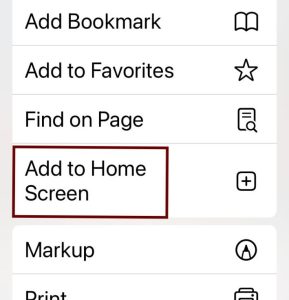
AddingYour Card to your Phone’s Home Screen
Adding a website to your phone’s home screen creates a quick shortcut that looks and acts just like an app icon. Here is exactly how to set this up on both iPhone and Android devices. iPhone (Using Safari) 1.Open Safari: Launch the Safari app and navigate to the exact website you want to save. 2.Tap…